
Result details
This screen splits the total score of one Feedback Mode result into compression, breath, and hands-off time scores. You can check which of depth, rate, and recoil went outside the target range and where hands stayed off the chest too long on a time graph, and export the result to Excel or PDF.
Requirements
Section titled “Requirements”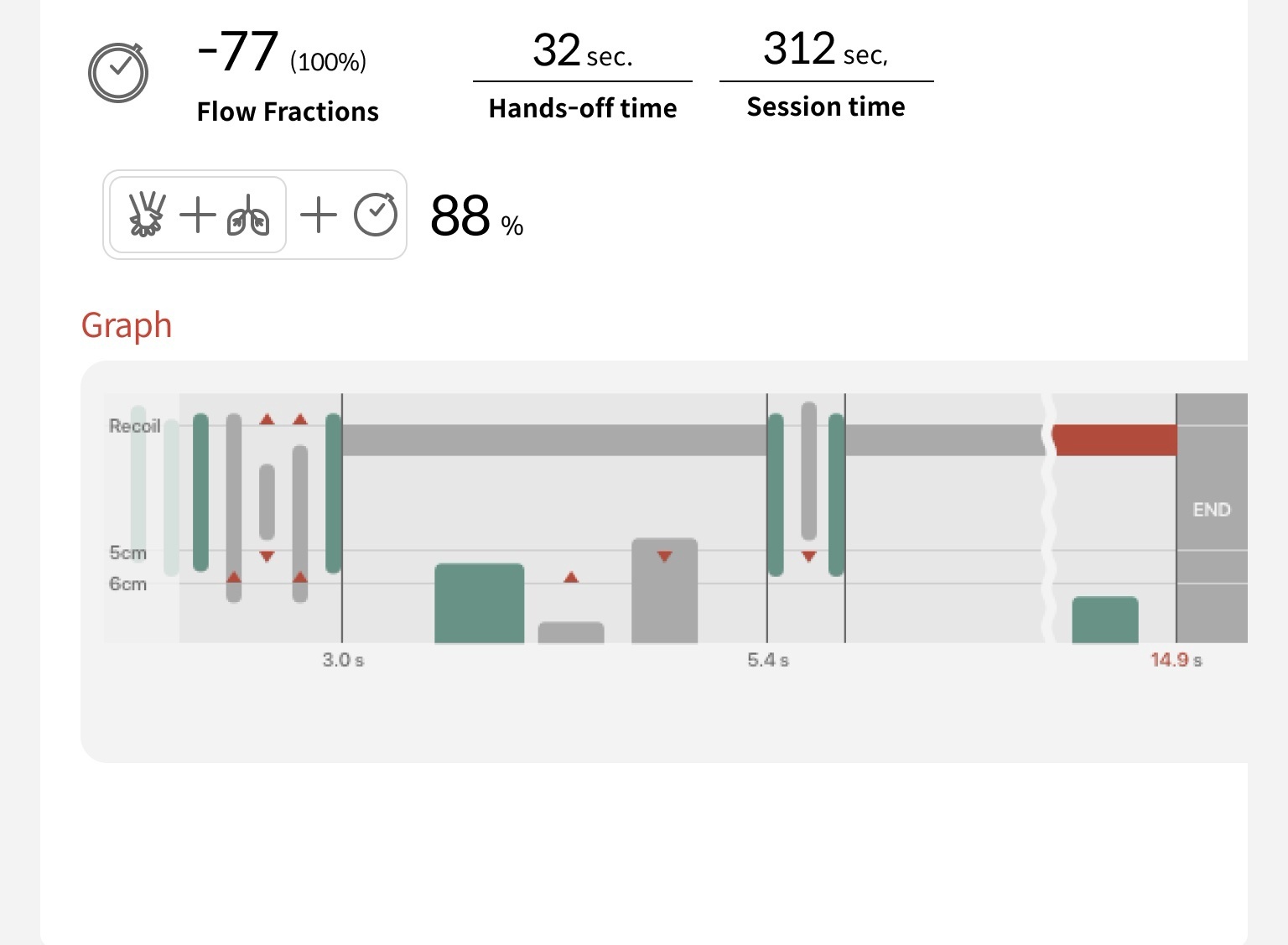
Screen location
Section titled “Screen location”- Home › Results
- Feedback tab
- Expand a session
- Select a result row
You can also open this screen by selecting the score card after a measurement ends in Feedback Mode.
Screen layout
Section titled “Screen layout”Result info and total score
Section titled “Result info and total score”- 1Manikin ID color and name: The default name is F plus the result number (for example, F000128). Select the pencil icon to change it in the Edit Result Name window, up to 30 characters. The two lines below show the date and time of the measurement, and the manikin model | guideline.
- 2CPR mode: Conventional CPR or Hands-only CPR. If breaths were not measured, the breath icon is dimmed. Select Setting Details to see the settings used for the measurement in the Training Info window.
- 3Cycle: Select All or a cycle number, and the scores and graph below show only that cycle. A cycle is one set of compressions plus the breath time after it.
- 4Total score (%): See “Total score calculation” below.
- 5Card header: Select it to expand or collapse the card. A card with no records stays collapsed and can’t be selected.
- 6Export button: Exports to an Excel or PDF file. See “Result export” below.
Score cards
Section titled “Score cards”Total score calculation
Section titled “Total score calculation”Total score = (compression score × compression weight + breath score × breath weight) × hands-off time score (%)
The compression score and breath score are each 0–100. If hands-off time does not count toward the score, the last multiplication is skipped. For Hands-only CPR, the compression score is multiplied only by the hands-off time score (%). Decimals are dropped.
Example: when compression:breath = 75:25, the card values compression 62/75 and breath 19/25 already have the weight applied. 62 + 19 = 81, hands-off time score 88% → 81 × 88% ≈ 71 → total score 71%. The 10 points taken off are shown as −10 in the hands-off time box.
You set the Compression:Breath Score Weight and whether hands-off time counts toward the score in Assessment Settings.
Compression card
Section titled “Compression card”- 1One-line summary: Green means within the target range, red means something to fix (see “One-line summary messages” below).
- 2Red vertical line: The average. Each bar is the number of compressions in that range, and the number under the bar is the count.
- 3Bar color: Green = a range within the target range, gray = a range outside it.
- 4Average and Accuracy: The average depth and rate, and compressions within the target range / all compressions.
- 5Recoil circle: The green part is the share of compressions where the chest was fully released after pressing.
Breath and hands-off time cards
Section titled “Breath and hands-off time cards”- 1Lung picture: The filled height is the average breath volume. Yellow = too little, green = right, red = too much.
- 2Hands-off time score: The number in front is the points taken off, and the % in parentheses is the hands-off time score.
- 3Time bar: The white part is time spent pressing the chest, and the pink part is time with hands off the chest. The two lines below show each time in seconds.
- 4% marked with *: The * Compression ratio (the share of time spent pressing). It is Good at 80% or more for Conventional CPR and 95% or more for Hands-only CPR. It is a different value from the % in parentheses (the score).
One-line summary messages
Section titled “One-line summary messages”| Text on screen | Meaning |
|---|---|
| Good | Most were within the target range. (For hands-off time: the time with hands off the chest was short enough) |
| Weak / Strong | Depth: more compressions were too shallow / too deep. Breath: more breaths had too little / too much volume. |
| Slow / Fast | More compressions were slower / faster than the recommended rate. |
| Compress consistently. | Weak and strong compressions (or slow and fast ones) are mixed about equally, or the average is within the target range but uneven. |
| Recoil needed | Many compressions did not fully release the chest after pressing. |
| Shorten the hands-off time | The time with hands off the chest is long compared with the total time. |
Time graph
Section titled “Time graph”Graph elements
Section titled “Graph elements”The Graph at the very bottom shows the whole measurement in time order. If it is long, scroll sideways to see it.
- 1Compression bar (top down): One compression. The longer the bar, the deeper the compression. Green = good compression, gray = compression with a depth or recoil problem.
- 2Red triangle: The type of problem. ▲ above the Recoil line = incomplete recoil, ▼ below the 5 cm line = weak compression, ▲ above the 6 cm line = strong compression.
- 3Horizontal band: Time with hands off the chest. The part after 10 seconds is shown in red.
- 4Wavy line: Marks a stretch of more than 5 seconds with no input, shown shortened. The time numbers still show the actual time.
- 5Breath bar (bottom up): One breath. The higher the bar, the larger the breath volume. ▲ above the 400 mL line = weak breath, ▼ below the 600 mL line = strong breath (only for Conventional CPR).
- 6Stretch boundary: Shown with a vertical line and an icon (compression start or breath start). The number under the line is the time of the stretch just before it, and it is shown in red if it is over 10 seconds. The gray box END at the very end is where the record ends.
- 7Scale on the left: Changes to match the stretch as you scroll the graph. It shows recoil and cm in compression stretches and mL in breath stretches, and is empty in stretches with only hands off the chest (Hands-only CPR).
Result export
Section titled “Result export”Export Data window
Section titled “Export Data window”- 1Export button: At the top right of the screen. Select it to open this window.
- 2Excel or PDF: Select one file format.
- 3Preview: Check what the PDF will look like first (PDF Preview). When you come back from the preview, PDF is selected.
- 4Export: Creates the file. It is grayed out until you select a format.
Mission Mode ranking table
Section titled “Mission Mode ranking table”Mission Mode results are checked in the ranking table (session results) and each participant’s row in it (individual result summary) instead of this screen. For how to open the ranking table, see Results list. Hover over the ? in the table header to see the same explanation in the app (except Max Combo).
Frequently asked questions
Section titled “Frequently asked questions”The compression (or breath) card won’t expand
That result has no compression (or breath) records at all. A card with no records stays collapsed and can’t be selected.
There’s no breath score
Breath scores exist only for Conventional CPR results. Results measured with Hands-only CPR (Hands-only CPR) have no breath card, and the maximum compression score is /100.
The hands-off time score is negative
This is normal. The number in the hands-off time box is the points taken off the total score for keeping hands off the chest too long, so it is shown as a minus. 0 means nothing was taken off, and the shorter the time compressions are stopped, the less is taken off. If you do not want hands-off time to count toward the score, turn off hands-off time in Assessment Settings. From the next measurement on, no points are taken off. For how it is calculated, see “Total score calculation” above.
The time under the graph is in red
It means that stretch was longer than 10 seconds. If it is a hands-off stretch, the end of the band is also shown in red. One set of compressions (30 compressions) usually takes more than 10 seconds, so the time of a compression stretch can also be shown in red.
I can’t find the PDF file
When saving is done, the save location is shown after “PDF saved: …” at the bottom of the screen. It is usually the PC’s Downloads folder, and the file name starts with CPR_Result_. For Excel, it shows “Excel saved: …”.
It says “PDF export failed”
If the “PDF export failed: …” message is shown, wait a moment and export again. If it keeps happening, please write down the error details after the message and contact contact@imlabworld.com. To learn how to send the error log with your message, see Troubleshooting.
I changed the name. Does it change on other screens too?
Yes, the results list shows the new name too.