
Mission Mode
Several students race each other at the same time with chest compressions. The better their depth, recoil, and rate, the faster their heart moves forward. With rescue breathing turned on, they also practice managing oxygen.
Requirements
Section titled “Requirements”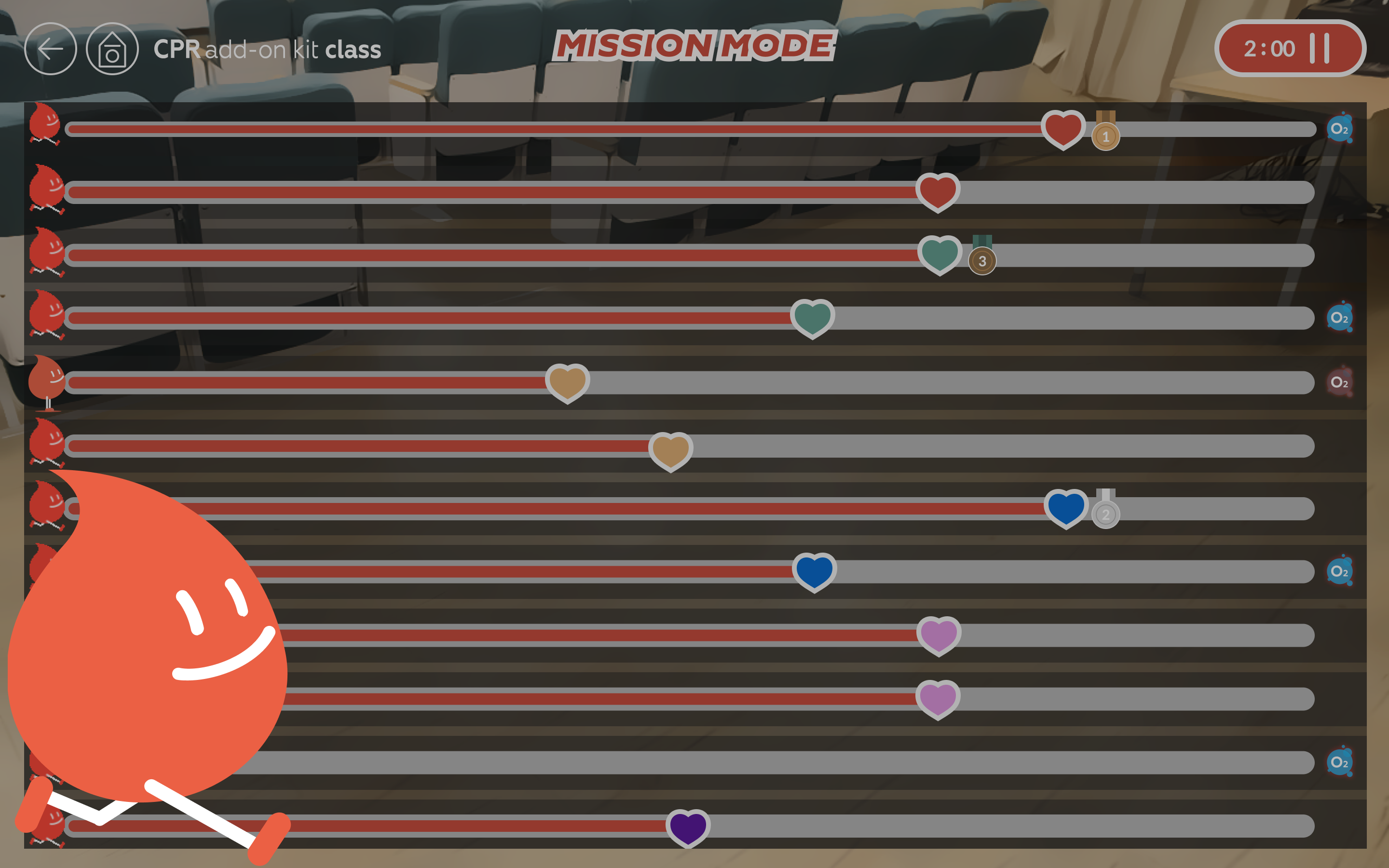
Race rules
Section titled “Race rules”The goal is to raise the survival rate to 100% with chest compressions. The survival rate is shown by how far the heart has moved along the bar.
- Survival rate gain: Each compression adds the amount of blood it pumped × the oxygen at that moment. It goes up more with enough depth, full recoil, and the right rate. Pressing too deeply actually makes it go up less.
- Oxygen: When Enable Rescue Breathing is on, oxygen drops a little over time and with every compression, and it fills up again with rescue breaths. With less oxygen, the same compression gains less. When it is off, oxygen does not drop.
- Finish line: The longer the time limit, the farther away the finish line (target distance). Unlimited uses the same distance as 4 min.
- Rank: During the race, the order is by survival rate. In a race with End the session when the first person reaches 100% turned off, people who reached 100% are placed ahead, and among them the order is by survival score. After the race, the ranking table on the results screen is always ordered by survival score.
Race end conditions
- When the time limit runs out (with Unlimited, time never ends the race)
- With End the session when the first person reaches 100% on: the moment one person reaches 100% (step 1 ④)
- With it off: when everyone has reached 100%
- When the instructor ends it with the time button (step 3)
How to use
Section titled “How to use”- Participants · rules
- Waiting screen
- Race
- Results
Participant and rule settings
Section titled “Participant and rule settings”On the Home screen, select Mission Mode to open the Measurement settings screen. Participants are on the left, rules on the right. To connect more manikins, select the Search button at the bottom right.
- 1Participants: Select each manikin that will race. Select All selects them all; Collapse folds the list into one line that shows only the number of participants.
- 2Enable Rescue Breathing: On = a race with rescue breathing; off = a race with chest compressions only. Off by default.
- 3Session Time Limit: The default is 1 min. A longer time limit also moves the finish line farther away.
- 4End the session when the first person reaches 100%: When on, the race ends the moment the first person reaches 100%. When off, it continues until everyone finishes. Off by default.
- 5Arrow at the top right (Next): Opens the race screen. It is grayed out when no participant is selected.
Race waiting screen
Section titled “Race waiting screen”Before the start, the screen shows how to read it, so you can simply show it to your students. The bar at the top (number 99) is a sample bar from the app, not a participant.
- 1Start Assessment: After a 3, 2, 1 countdown, the race and the timer start.
- 2Participant Number: The number and color on the heart are your manikin’s ID.
- 3Blood Flow: Runs faster the better the compressions.
- 4SpO2 Warning Light: Flashes red when oxygen is low. Refill it with rescue breaths.
Race in progress
Section titled “Race in progress”- 1Time left: With Unlimited, the elapsed time is shown instead. Select it to pause the race and open the Paused window → Resume or Quit.
- 2Progress bar: The heart moves toward the finish line (the right end of the bar). At 100%, the bar turns green.
- 3Medals: Gold, silver, and bronze go to whoever is 1st, 2nd, and 3rd right now. Anyone who reaches 100% without a medal gets a green check mark.
- 4Combo: The number of correct compressions in a row.
- 5Oxygen gauge: The oxygen left. It flashes red when oxygen runs low. The less oxygen, the less the survival rate and survival score go up, even with good compressions.
During the race, the back and Home buttons are grayed out. The row of a manikin that disconnects is shown semi-transparent.
Race results
Section titled “Race results”When the race ends, a podium and ranking table are shown, and the results are saved automatically.
- 1Podium: The manikin IDs of 1st, 2nd, and 3rd place.
- 2View Full Ranking: Re-ranks everyone together with past results saved on this PC that have the same conditions (time limit and CPR mode) and the end condition All completed. While it is on, the button shows Showing Global Ranking, and the conditions and “All Records Ranking” are shown above the table. Select Exit Global View to return to the original ranking.
- 3Ranking table: Ordered by survival score, highest first.
- 4Pencil: Edits all participant names at once. Hover over a name and select it to edit just that one (Edit Student Name window).
- 5?: Hover over it to see what that column means (table below).
| Ranking table column | Description (app tooltip) |
|---|---|
| Survival Rate (%) | Survival Rate indicates how much of the survival target was achieved. |
| Survival Score (pts) | Survival Score comprehensively evaluates the overall quality of CPR performance. |
| Avg. Blood Flow (mL/min) | Avg. Blood Flow is the average cardiac output generated during CPR. |
| Avg. SpO2 (%) | Avg. SpO2 is the average oxygen saturation during CPR. |
| Max Combo (reps) | The longest run of correct compressions in a row. |
When some manikins are disconnected
Section titled “When some manikins are disconnected”Some manikins disconnected window
Section titled “Some manikins disconnected window”Shown when you select Start Assessment while some of the selected participants are disconnected.
- 1Message: How many manikins are disconnected, out of the total.
- 2Disconnected manikins: Each one’s ID (color + number) and name. A manikin without a name is shown as Unknown Manikin. You can also select Cancel, reconnect that manikin, and then start (Manikin connection).
- 3Start: Drops the disconnected manikins from the participants and starts the countdown with the remaining ones. Select Cancel to leave everything as it is.
Frequently asked questions
Section titled “Frequently asked questions”When does the combo go up?
It goes up with each correct compression you make in a row. A correct compression = rate of 100–120 per minute + depth within the target range + releasing almost fully (coming back up to within 1 cm). If any one of these is off, the count starts again from 0. The depth target follows Assessment Settings.
When does oxygen go down, and when does it fill up?
It goes down only when Enable Rescue Breathing is on. It drops a little over time and with every compression, and it fills up again with rescue breaths. With less oxygen, the same compression moves you forward less. When it falls below 60%, the gauge flashes red.
The oxygen gauge doesn’t go down / No warning is shown
When Enable Rescue Breathing is off, the oxygen always stays full. Turn it on if you want to practice rescue breathing too.
I can’t select the arrow at the top right
No participant is selected yet. Select a manikin in the list on the left.
There are no manikins in the list on the left
Only connected manikins are shown. First connect manikins with the Search button at the bottom right (Manikin connection).
Nothing happens when I select Start Assessment
All the selected participants may be disconnected. Check the manikins’ power and connection, then select it again. On a student tablet, this button cannot be used.
View Full Ranking is grayed out
It works only for races that ended because everyone finished or the time limit ran out. It is grayed out for races run with End the session when the first person reaches 100% turned on and for races ended midway with Quit, and these races also cannot be grouped in the results list. To compare rankings with past results, turn this switch off for the next race and keep going until everyone finishes or the time limit runs out.
I want to stop in the middle of a race
Select the time button at the top right to open the Paused window. Select Quit to end the race, or Resume to keep racing.
I can’t go back to Home during a race
While the race is running, the back and Home buttons are grayed out. End the race with the time button → Quit first, then leave the screen.